Revenue loopPlanned
Lead -> Bid -> SignaturePlanned: commercial work attached to source, version, review state, and next safe action.
Start with a founder-led workflow conversation. Construction software is a controlled pilot in development, not field-proven. Broader CRM, document, finance, and customer modules are future vision.
These are requirements to implement and verify, not evidence of deployed capability: what changed, who owns it, what source is trusted, and whether action is safe.
Planned: commercial work attached to source, version, review state, and next safe action.
Design requirement: packages should remain reviewable before customer or contract exposure.
Controlled construction pilot in development, not field-proven. These example states are illustrative.
Future direction: inspectable records across pipeline, documents, construction, and finance. No measured business outcome is claimed.
Required before use: a source-confidence label, system owner, and approved action boundary.
Availability must be backed by field, source, security, and support evidence. A mockup or a passing local test does not establish customer readiness.
Pilot in development, not field-proven: a daily view of construction attention, owners, next actions, blockers, and source freshness.
Future vision: a pool-builder CRM connecting lead intake, customer history, follow-up, estimate context, and job handoffs.
Planned: versioned commercial records for calculator assumptions, options, pricing notes, documents, and review state.
Planned: proposal approval, signed-state protection, and change-order controls. No supported DocuSign integration is claimed.
Pilot in development, not field-proven: construction source state, next action, owner, blockers, and freshness. Each source requires a separately approved scope.
Planned: finance handoff visibility for estimates, invoices, payments, and deposits. No supported QuickBooks integration is claimed.
Planned: reviewed customer updates, closeout prompts, and communication controls; not an available automated messaging service.
In development: a shared PipeDream brain on Databricks for evidence-backed advice, separate from the CRM. Customer isolation and field behavior require verification before use.
Synthetic examples from the construction pilot, not a live product or customer result.
Give the work an owner, a next action, and a due date. Keep the handoff with the job instead of in someone's memory.
This recorded build supports self-assignment or unassigned work, with an explicit timezone for due dates.
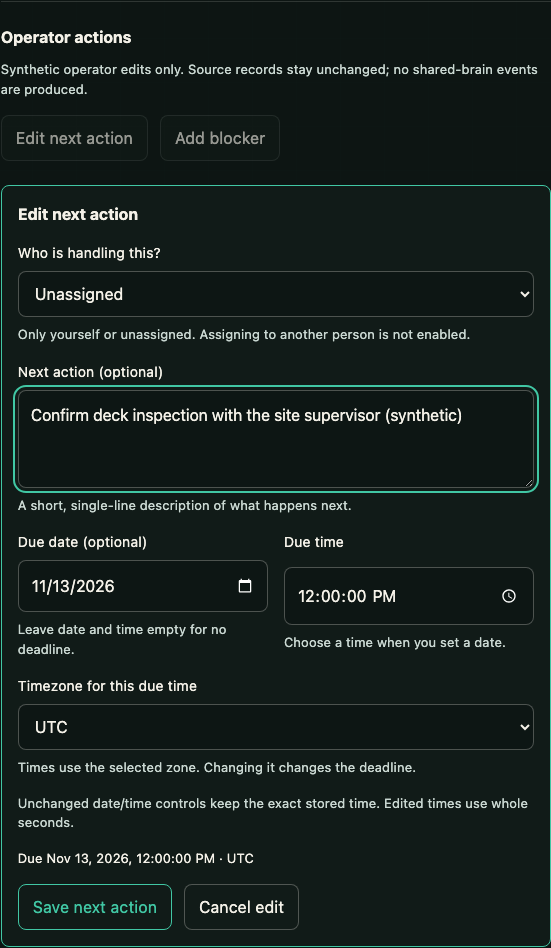
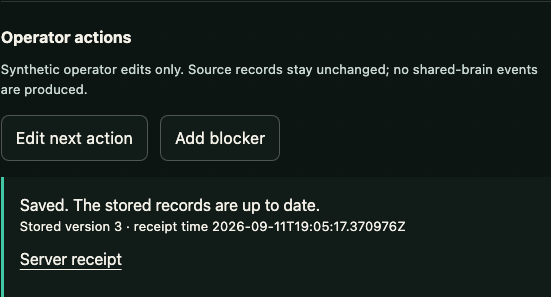
The next action is attached to the job. A stored version and server receipt confirm the save—not just a change on one person's screen.
This example shows stored version 3 from a synthetic construction job.
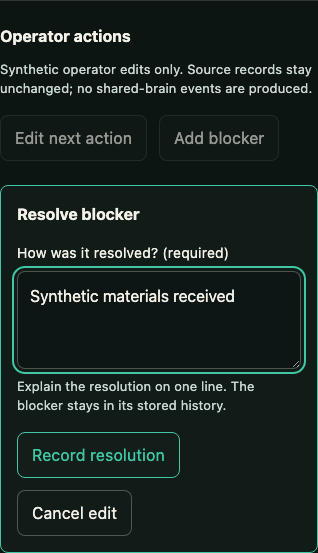
Explain what cleared the blocker before recording the resolution. The reason belongs with the work, where the team can find it.
This screen shows the resolution editor, before submission—not a completed resolution receipt.
Actual development screens, not a live connection or customer result. The construction pilot is in development, not field-proven.
Tell us about your pool company and the work that keeps landing back on your desk. We’ll talk about whether there’s a useful next step together.